Showing posts with label Live Writer. Show all posts

4 April 2009

WLW: xPollinate Part 2

As per my previous post, I am testing out xPollinate for Windows Live Writer.

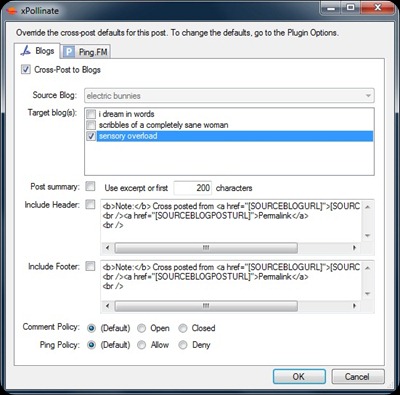
To use the plug-in, you need to compose your blogpost in WLW and publish it to your first blog. Then, you click the xPollinate link in your plug-ins bar.

wlwpluginsview wlwxpollinate


Configure the blog(s) you want to post to, select if you want a header or footer stating that it was cross posted from the original blog, and click OK.

Your content will now be posted to all selected blogs.

Note: The other blogs will not automatically open after posting like it normally does with WLW, but I have checked and posting appears to be instantaneous.

Hint: If you select a header or footer, be sure to leave space for them in your post. Add an extra space above or below your entry, just to be sure.

30 September 2008

Scheduling posts in Windows Live Writer

The quickest way to lose readers is to not post. Unfortunately, most of us have lives away from the keyboard, and often, life can interfere with our regular blogging program.

Luckily, with a tool like Windows Live Writer, you can prepare your content ahead of time, and then schedule your blog posts to post at regular intervals.

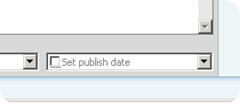
To schedule a blog post using WLW, prepare your content, and then click on the Set publish date option in the bottom right hand corner of the post window.

image

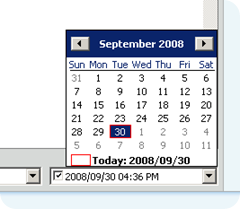
A calendar will pop up, allowing you to choose the desired publish date.

image

You can also change the publish time by typing into this field. You can now click publish.

WLW will, by default, open your blog page in your default browser after posting. You will notice that your scheduled post does not appear, as it usually does, at the top of your blog.

If you use Blogger as your blogging platform, you will now need to log into the dashboard. Click on Edit Posts.


image

You should now see a list of all your published posts, as well as your scheduled post.

image


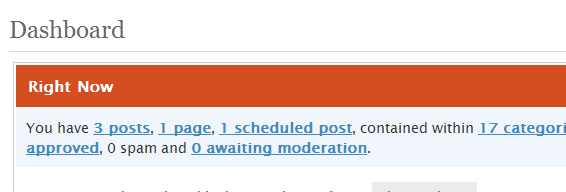
If you have a Wordpress blog, log into the WP dashboard. You should see something that looks like this, including the n scheduled post item:

image


Happy blogging!

16 August 2006

Live Writer

the husband was so kind to find the Live Writer for us, and i finally took some time to check it out. in fact, this is my first post using it, rather than using email.

so far, the interface is friendly. i was hoping to have some of the features of my beloved Semagic client for LJ, and i think i have it here. this means i can post far more easily to my Live blog now, but i am still not entirely sure i would, because there are still 2 things missing from Spaces that i have with my other blogs:

  • Email notifications of comments: it would be really great to be notified that one has received a comment on a post, or a response to a comment. i am not in the habit of reading my own blogs, nor do i go back to places i commented on that frequently.
  • Blog backup: the ability to use a tool like LJ archive on Spaces would be fantastic, as I like keeping backups of my posts (in case, on day, i want to extract information from it, and/or the blogging service disappears)

but i like the ease of use of Writer, and it would be great if the Semagic client learnt a thing or two from this interface, especially the adding of pictures.

Related Posts with Thumbnails